TONIGHT! Lake Park Meet Details
Lake Park Swim Club
6333 Lakeland Drive
Raleigh, NC 27612
1) CASH ONLY CONCESSIONS!
Lake Park has a large selection of items to eat for dinner which usually include: Chick-fil-A sandwiches, pizza, hotdogs, mac-n-cheese, BBQ sandwiches, baked potatoes, fresh fruit, homemade desserts, chips, doughnuts, ring pops, and more! We also have soft drinks, water, Gatorade, juice boxes, etc.
2) Warmups begin promptly at 5:30 ... Parking for our team is on the street, so plan accordingly.
3) ARRIVING/UNLOADING
Unfortunately, there is limited parking. Parking at Lakepark is reserved for team's coaches, managers, volunteer coordinators, handicap or other families with mobility issues. You may stop in front of the pool to unload kids and other items.
WHERE TO PARK
Cars can park on Lakeland Drive or any street in the neighborhood being careful to not block driveways, fire hydrants, etc. There is also parking on Rushingbrook (first right after turning onto Lake Park Drive) and then use the greenway path to the pool.
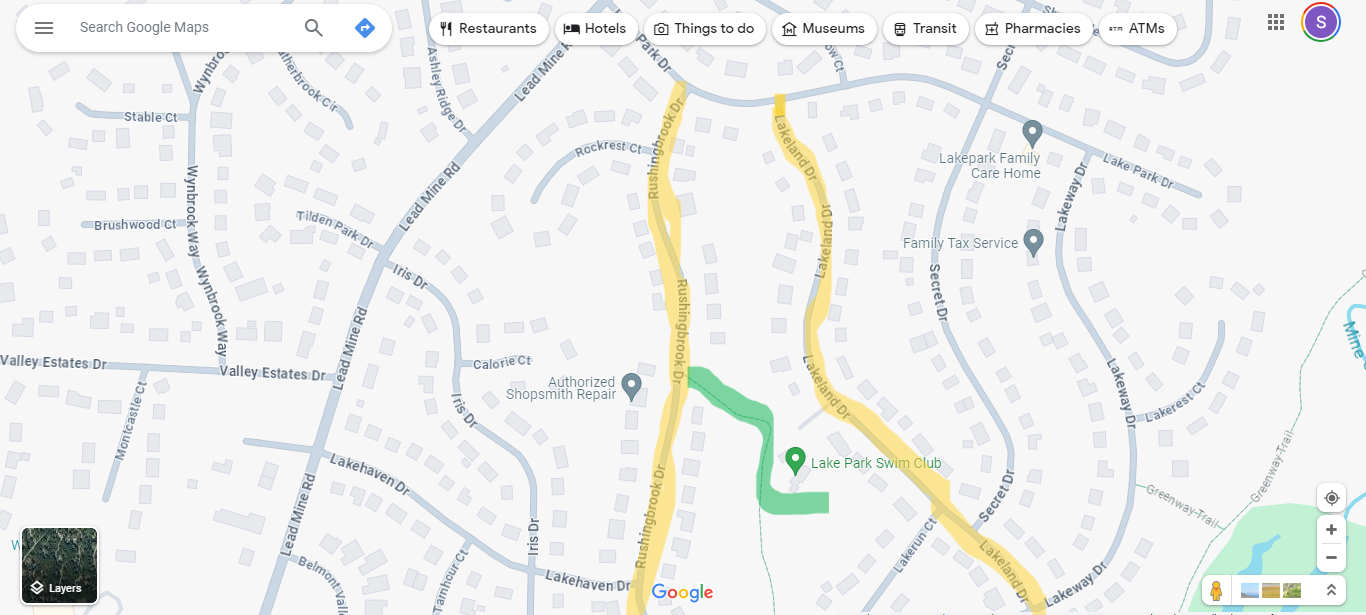
4) Seating: (bring chairs) There is a place on the pool deck for visiting team families (on the right side when you first walk in) - It's cozy with some tables with umbrellas and lounge chairs. You are welcome to sit on and around the volleyball courts as well, they are located just outside the fence. There are picnic tables in that area.
5) Volunteer Meeting is at 5:45. Please note we still have timer positions open :)

